DBF Viewer Plus
DBF Viewer Plus is a portable DBF database table viewer and editor plus some additional features for searching, importing and exporting to a number of different formats. DBF formats include dBase, Clipper and Foxpro.

DBF Viewer has the following features:-
- Open and viewing DBF File.
- Filtering on multiply fields to query data.
- Printing Tables and preview
- Add, Edit, Deleting and Updating records.
- Search with partial and Case Insensitive options
- Go to specified field (for tables with lots of columns)
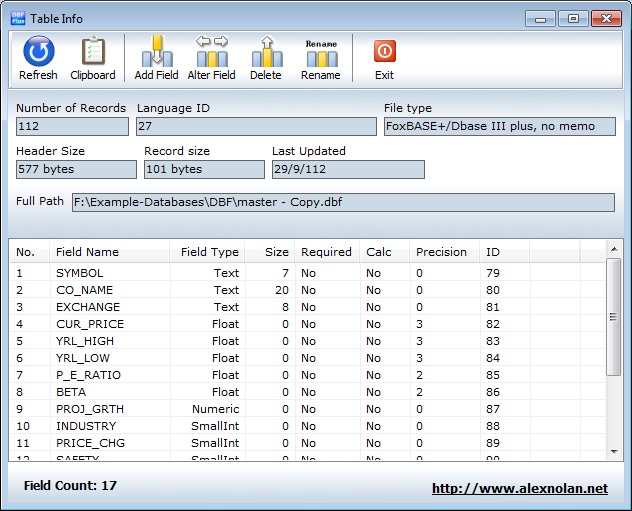
- Table Info displaying Record count, Type, Language type, Records size, Indexed, Encryption, Last updated, fields and field types.
- Pack Table.
- Zap Table (Empty).
- Show / Hide Columns.
- Export to formats such as CSV, PDF, XLS, RTF, WKS, XML, HTML, DBF.
- Import wizard with field mapping.
- Record View and editing screen.
- New Table (Create a DBF File)
- Open table using command line parameters
- Set Table Type
- Visual Count
DBF Table Info - Screen
Printing
You can control which columns are print by using the Show / Hide dialog to
hide columns
that you don't want to print.
To create more space for columns reduce the width of columns
in the grid.
Opening
You can open a DBF automatically from a shortcut using command line parameters:-
E.G. "C:\UTILS\DBFPlus.exe c:\dbf\master.dbf /full"
Memo fields
To edit the text in a memo field simply select the field RIGHT CLICK and select "View / Edit Memo field"
DBF Viewer does not require installation in order to run and therefore can be used to query data on a customers server without it needing to be installed first. It can be run from a CD or DVD and consists of just one EXE file.
This utility accesses DBF Files directly and can filter large tables at a reasonable speed.